
-
YumaPOS
-
- The YumaPOS Ecosystem
- Plan Where You Want to be in 6 and 12 Months from Now
- Create Your YumaPOS TENANT
- Create STORES in your YumaPOS TENANT
- Make Life Easy : Preset Some Basic Settings
- Which is best for You? Manual Entry or Data Import?
- Great Structure Makes Selling Easier
- Positive Planning Prevents Poor Performance
- POS and ORDER Fundamentals
- Getting to Know Your New BOM
- Cheap Internet Can Cost Businesses Time, Money and Productivity
- Security : Do you Really Want Your Staff Doing That?
- Stock Control: What It Is and How to Know If It’s Right for Your Business
- Scale Your Business : YumaPOS for Single to Franchise Growth
- A Quick Guide to Where ITEM Cost Comes From
- Know Your Customers, Earn Their Loyalty, Grow Your Sales
- Yumapos Price Lists, Holiday Promotions & Surcharging - Made Easy
- Glossary of Terms
- Show Remaining Articles (3) Collapse Articles
-
-
- Quickly List Transactions Created by Your STORES and APPs
- Easily See Transactions by Staff Member
- It is Simple to Track Sales by Terminal
- Processing Order Tracking: How to Minimise Operational Loss
- Voided Orders Explained: Why You Need to Catch Them
- Action Logs: Why they are Important to Your Business
-
-
- Articles coming soon
-
- Articles coming soon
-
- Articles coming soon
-
- Articles coming soon
-
- Articles coming soon
-
- Articles coming soon
-
- Articles coming soon
-
- Articles coming soon
-
- Articles coming soon
-
- Articles coming soon
-
- Articles coming soon
-
- Articles coming soon
-
- Articles coming soon
-
-
- Inventory Items & Menu Items: Can You Tell the Difference ?
- Your Easy Guide to Menu Item Basics
- How to View and Manage the Menu Items List
- Create and Manage Menu Categories Easily
- Understanding Item Modifiers for Accurate Production and Lower Costs
- Complete Guide to Managing Item Modifiers in Your Business
- Point of Sale Price Lists Made Easy : A Complete Guide
- Daily Menu Configuration and How to Use Them
- How to Use Stop Lists to Prevent Overselling
- Changing Default Language for Production
-
-
- Articles coming soon
-
- Articles coming soon
-
- Articles coming soon
-
- Articles coming soon
-
- Articles coming soon
-
- Articles coming soon
-
-
-
- Articles coming soon
-
- Articles coming soon
-
- Articles coming soon
-
-
-
- Articles coming soon
-
- Articles coming soon
-
- Articles coming soon
-
- Articles coming soon
-
- Articles coming soon
-
-
-
- Articles coming soon
-
- Articles coming soon
-
- Articles coming soon
-
- Articles coming soon
-
-
-
- Articles coming soon
-
- Articles coming soon
-
- Articles coming soon
-
- Articles coming soon
-
-
-
- Articles coming soon
-
- Articles coming soon
-
- Articles coming soon
-
- Articles coming soon
-
- Articles coming soon
-
- Articles coming soon
-
- Articles coming soon
-
- Articles coming soon
-
- Articles coming soon
-
- Articles coming soon
-
- Articles coming soon
-
-
-
- Articles coming soon
-
- Articles coming soon
-
- Articles coming soon
-
- Articles coming soon
-
- Articles coming soon
-
- Articles coming soon
-
- Articles coming soon
-
- Articles coming soon
-
- Articles coming soon
-
- Articles coming soon
-
- Articles coming soon
-
-
-
- Articles coming soon
-
- Articles coming soon
-
- Articles coming soon
-
- Articles coming soon
-
- Articles coming soon
-
- Articles coming soon
-
-
- Articles coming soon
-
- Articles coming soon
-
- Articles coming soon
-
- Articles coming soon
-
- Articles coming soon
-
- Articles coming soon
-
- Articles coming soon
-
-
- Articles coming soon
-
- Articles coming soon
-
- Articles coming soon
-
- Articles coming soon
-
- Articles coming soon
-
- Articles coming soon
-
- Articles coming soon
-
-
- Articles coming soon
-
-
-
YumaPAY
Introduction
By now, we have a pretty good understanding of how everything YumaPOS “fits together”.
We have sales data coming in from our POS APPs, Uber Integration, eSHOP, Mobile App & Website, but we want to offset it with the cost of goods we are buying in / producing.
This is an overview designed to introduce you to new concepts, with detailed information available from your support team and / or knowledgebase articles.
Where do the Costs Come From ?
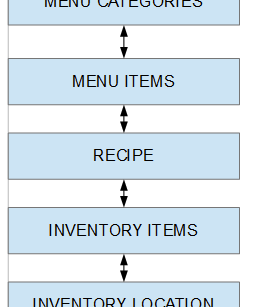
A quick review of earlier articles shows us the “link” between INVENTORY ITEMS and MENU ITEMS is the RECIPE.
So when we give an INVENTORY ITEM a cost price, the RECIPE will apportion that cost to the MENU ITEM.
BOM : Item List : Cost Toggle
This is a good time to show you the COST toggle in your BOM.
By default, this is turned off, but I like to use it as a quick sanity check that I haven’t made an error in a RECIPE or VENDOR INVOICE.
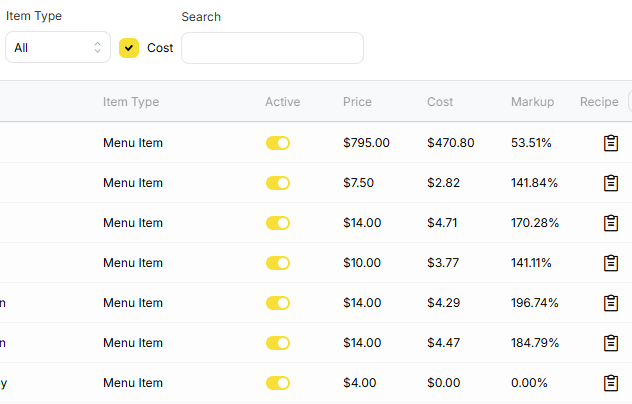
So we are are on our BOM in Items List and have turned on “Cost” in the header bar.
On the far right, we can clearly see that these MENU ITEMS have a RECIPE.
We can also see what we sell them for and what the calculated cost is.
Our Markups are all positive ( That’s a good sign ).
None of those figures stand out as patently incorrect.
The last MENU ITEM does have a RECIPE, but it doesn’t have a COST calculated.
Our cost price is calculated from our INVENTORY ITEM.
Inventory Item & Cost Price
When you enter a VENDOR INVOICE, your BOM will assign a COST to each INVENTORY ITEM on that invoice.
When creating an INVENTORY ITEM, you can give it a “default cost price”. This is used when there has been no VENDOR INVOICE entered.
So the $0.00 as a cost price in the above image, is either :
- No VENDOR INVOICE has been entered yet
- No “default cost price” has been set
- The RECIPE is wrong
Inventory Transactions
The most common types are :
- Receiving
- Returning
- Write-Off
- Audit
Where you are a multi-store, you can also use :
- Transfer
Where you are turning INVENTORY ITEMS into other INVENTORY ITEMS you will also use :
- Production
- Disassemble
- Refactor
- Wholesale
FIFO
YumaPOS inventory management will use FIFO for costing.
“FIFO stands for “First In, First Out,” an inventory valuation method where the oldest goods purchased or produced are sold or used first.
The FIFO method is a widely used approach in accounting and inventory management that assumes the first items added to inventory are the first ones to be sold or used. This method ensures that older inventory is removed before newer inventory, which helps reduce the risk of obsolescence or spoilage, particularly for perishable goods.”
This is why you will sometimes see a report shows multiple cost prices for the same ITEM.
Date Sensitivity
If you change, as an example, the tax status of an ITEM, and then run a report that has a period of before and after the date and time you made that change, you will get that ITEM listed twice.
Once with the “previous” tax and once with the “new” tax.
Applying Inventory Documents
As a general rule, you do not have to worry about this concept, but you should be aware of it as it can have significant impact on your reporting.
YumaPOS uses FIFO, so when you enter a past dated transaction, it can change what has been reported on.
An example of this could be that you reconciled a creditor statement and identified a missing invoice from last month. Naturally, you would get a copy of this invoice and process it at the invoice date.
Your BOM is smart enough to UNAPPLY things, “insert” the new document, REAPPLY all the old documents and “recalculate” everything… for a period of 40 days.
If your missing document is older than 40 days you will have to do this manually.
Please call your support team for a walkthrough of APPLY and UNAPPLY.