-
YumaPOS
-
- The YumaPOS Ecosystem
- Plan Where You Want to be in 6 and 12 Months from Now
- Create Your YumaPOS TENANT
- Create STORES in your YumaPOS TENANT
- Make Life Easy : Preset Some Basic Settings
- Which is best for You? Manual Entry or Data Import?
- Great Structure Makes Selling Easier
- Positive Planning Prevents Poor Performance
- POS and ORDER Fundamentals
- Getting to Know Your New BOM
- Cheap Internet Can Cost Businesses Time, Money and Productivity
- Security : Do you Really Want Your Staff Doing That?
- Stock Control: What It Is and How to Know If It’s Right for Your Business
- Scale Your Business : YumaPOS for Single to Franchise Growth
- A Quick Guide to Where ITEM Cost Comes From
- Know Your Customers, Earn Their Loyalty, Grow Your Sales
- Yumapos Price Lists, Holiday Promotions & Surcharging - Made Easy
- Glossary of Terms
- Show Remaining Articles (3) Collapse Articles
-
-
- Quickly List Transactions Created by Your STORES and APPs
- Easily See Transactions by Staff Member
- It is Simple to Track Sales by Terminal
- Processing Order Tracking: How to Minimise Operational Loss
- Voided Orders Explained: Why You Need to Catch Them
- Action Logs: Why they are Important to Your Business
-
-
- Articles coming soon
-
- Articles coming soon
-
- Articles coming soon
-
- Articles coming soon
-
- Articles coming soon
-
- Articles coming soon
-
- Articles coming soon
-
- Articles coming soon
-
- Articles coming soon
-
- Articles coming soon
-
- Articles coming soon
-
- Articles coming soon
-
- Articles coming soon
-
-
- Inventory Items & Menu Items: Can You Tell the Difference ?
- Your Easy Guide to Menu Item Basics
- How to View and Manage the Menu Items List
- Create and Manage Menu Categories Easily
- Understanding Item Modifiers for Accurate Production and Lower Costs
- Complete Guide to Managing Item Modifiers in Your Business
- Point of Sale Price Lists Made Easy : A Complete Guide
- Daily Menu Configuration and How to Use Them
- How to Use Stop Lists to Prevent Overselling
- Changing Default Language for Production
-
-
- Articles coming soon
-
- Articles coming soon
-
- Articles coming soon
-
- Articles coming soon
-
- Articles coming soon
-
- Articles coming soon
-
-
-
- Articles coming soon
-
- Articles coming soon
-
- Articles coming soon
-
-
-
- Articles coming soon
-
- Articles coming soon
-
- Articles coming soon
-
- Articles coming soon
-
- Articles coming soon
-
-
-
- Articles coming soon
-
- Articles coming soon
-
- Articles coming soon
-
- Articles coming soon
-
-
-
- Articles coming soon
-
- Articles coming soon
-
- Articles coming soon
-
- Articles coming soon
-
-
-
- Articles coming soon
-
- Articles coming soon
-
- Articles coming soon
-
- Articles coming soon
-
- Articles coming soon
-
- Articles coming soon
-
- Articles coming soon
-
- Articles coming soon
-
- Articles coming soon
-
- Articles coming soon
-
- Articles coming soon
-
-
-
- Articles coming soon
-
- Articles coming soon
-
- Articles coming soon
-
- Articles coming soon
-
- Articles coming soon
-
- Articles coming soon
-
- Articles coming soon
-
- Articles coming soon
-
- Articles coming soon
-
- Articles coming soon
-
- Articles coming soon
-
-
-
- Articles coming soon
-
- Articles coming soon
-
- Articles coming soon
-
- Articles coming soon
-
- Articles coming soon
-
- Articles coming soon
-
-
- Articles coming soon
-
- Articles coming soon
-
- Articles coming soon
-
- Articles coming soon
-
- Articles coming soon
-
- Articles coming soon
-
- Articles coming soon
-
-
- Articles coming soon
-
- Articles coming soon
-
- Articles coming soon
-
- Articles coming soon
-
- Articles coming soon
-
- Articles coming soon
-
- Articles coming soon
-
-
- Articles coming soon
-
-
-
YumaPAY
So Many Options
YumaPOS is highly configurable.
While some changes are stand-alone, others rely on multiple settings being made.
Others will flow down / cascade.
When you are starting out, may I suggest you preset the following ?
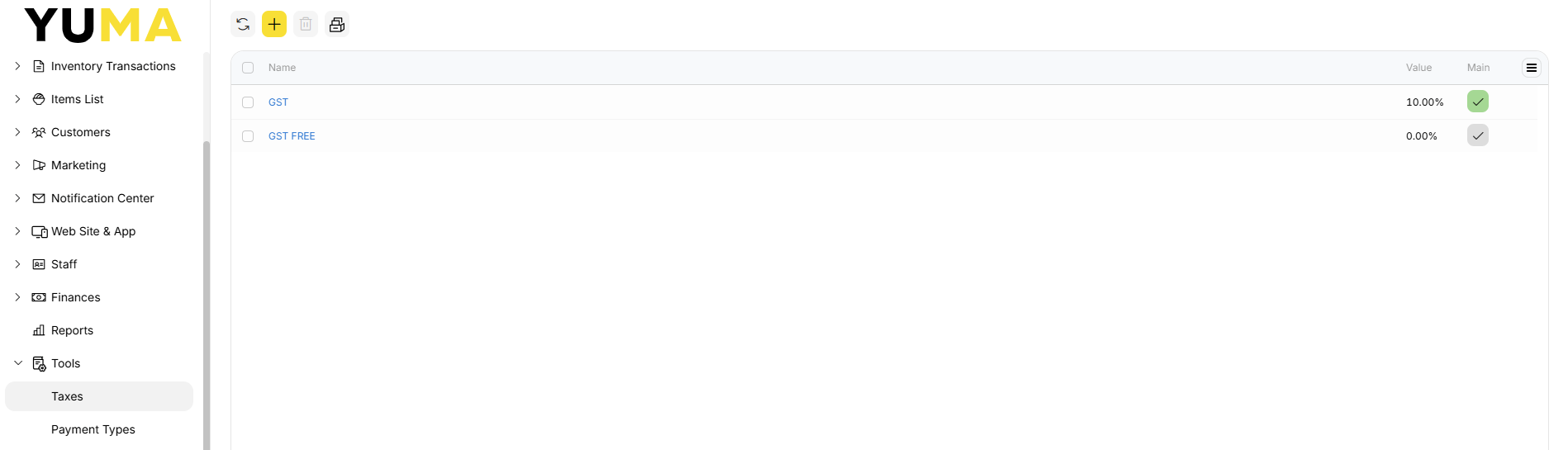
Tools / Taxes
For Australia you will need at least :
- GST 10%
- GST FREE 0%
Depending on your business model, set one of them as main ( default ).
Now when you add ITEMS the TAX will be prepopulated.
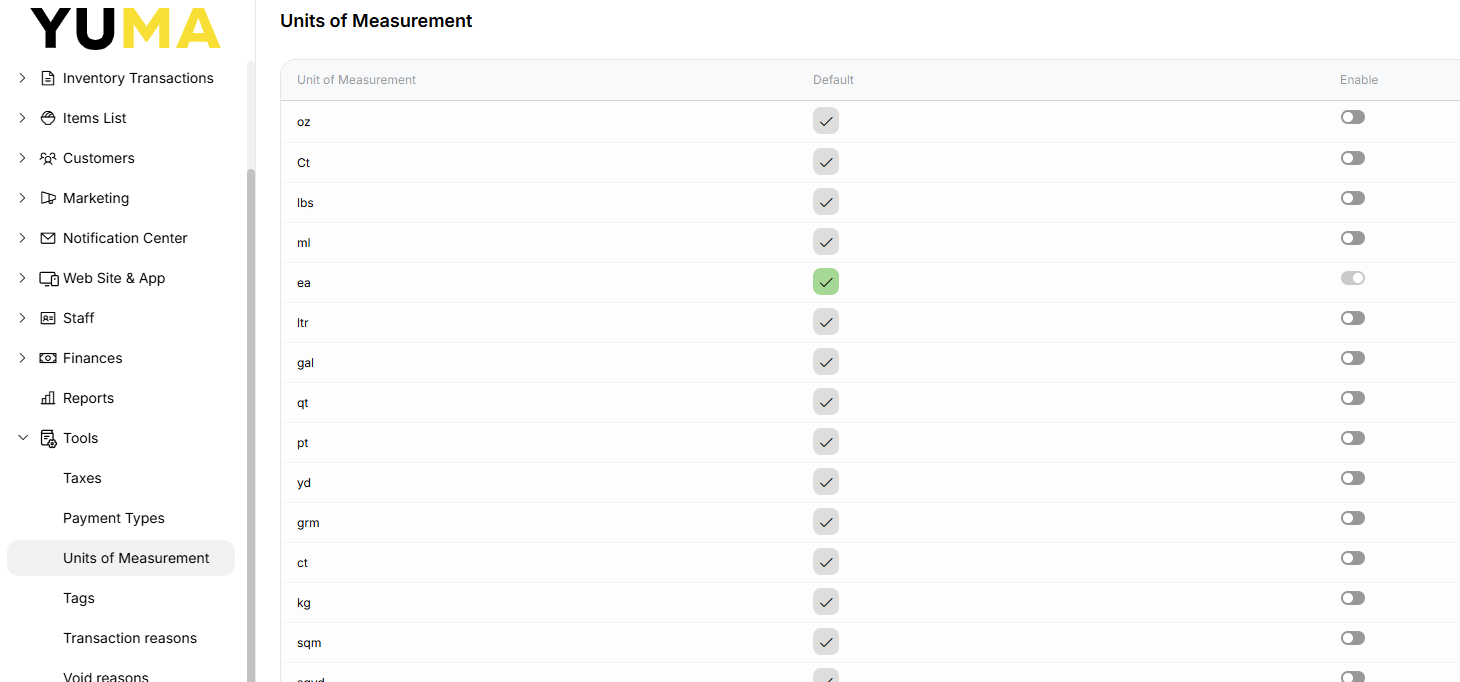
Tools / Units of Measurement
When you add new inventory item, menu item or modifier, you select their units of measurements (UOM) (such as, kilograms, grams, liters, etc.) from the provided built-in list. By default, that list includes over twenty various units. As a rule, you use a limited set of UOMs that depends on your country and particular features of your business.
Decide which ones you are going to use and set one of them as the default.
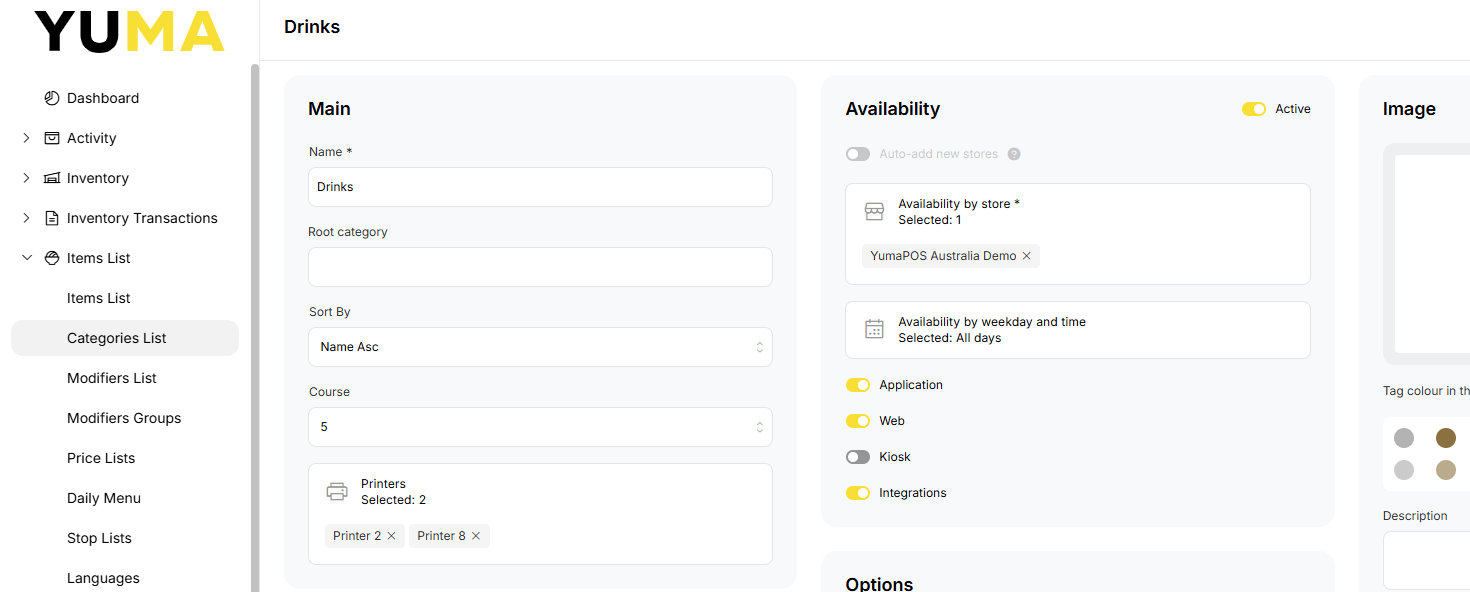
Production Printers
Usually, but not always, a kitchen or pick order will be sent to the same logical printer for all ITEMS in a CATEGORY.
Restaurant : All tandoor ITEMS might print to a dedicated Tandoor Printer, while all drinks would go to a Bar Printer, while all ITEMS would go to the Pass Printer.
Online Shop : Stock may be stored in different locations. So each location may get a production docket with only their ITEMS, while shipping get their production docket with everything listed.
When adding / editing a CATEGORY, preset the production printer/printers. Then when you add ITEMS into that CATEGORY, the production printer is already set.
See separate article for more information on mapping logical printers to physical printers, especially where a single physical printer can be multiple logical printers. A physical printer doesn’t even have to be a printer !
Sort Order
Most cashiers will look for something alphabetically. While I have seen some business owners put the most popular at the top of the list, it is quicker, especially for new staff or online customers, to find your ITEMS when they are listed in alphabetical order.
When adding / editing a CATEGORY, preset SORT BY to Name Asc (or any other available preference). Then when you add ITEMS into that CATEGORY, the ITEM will appear in that chosen order.
See separate article for Custom and using EDIT POSITIONS.