
-
YumaPOS
-
- The YumaPOS Ecosystem
- Plan Where You Want to be in 6 and 12 Months from Now
- Create Your YumaPOS TENANT
- Create STORES in your YumaPOS TENANT
- Make Life Easy : Preset Some Basic Settings
- Which is best for You? Manual Entry or Data Import?
- Great Structure Makes Selling Easier
- Positive Planning Prevents Poor Performance
- POS and ORDER Fundamentals
- Getting to Know Your New BOM
- Cheap Internet Can Cost Businesses Time, Money and Productivity
- Security : Do you Really Want Your Staff Doing That?
- Stock Control: What It Is and How to Know If It’s Right for Your Business
- Scale Your Business : YumaPOS for Single to Franchise Growth
- A Quick Guide to Where ITEM Cost Comes From
- Know Your Customers, Earn Their Loyalty, Grow Your Sales
- Yumapos Price Lists, Holiday Promotions & Surcharging - Made Easy
- Glossary of Terms
- Show Remaining Articles (3) Collapse Articles
-
-
- Quickly List Transactions Created by Your STORES and APPs
- Easily See Transactions by Staff Member
- It is Simple to Track Sales by Terminal
- Processing Order Tracking: How to Minimise Operational Loss
- Voided Orders Explained: Why You Need to Catch Them
- Action Logs: Why they are Important to Your Business
-
-
- Articles coming soon
-
- Articles coming soon
-
- Articles coming soon
-
- Articles coming soon
-
- Articles coming soon
-
- Articles coming soon
-
- Articles coming soon
-
- Articles coming soon
-
- Articles coming soon
-
- Articles coming soon
-
- Articles coming soon
-
- Articles coming soon
-
- Articles coming soon
-
-
- Inventory Items & Menu Items: Can You Tell the Difference ?
- Your Easy Guide to Menu Item Basics
- How to View and Manage the Menu Items List
- Create and Manage Menu Categories Easily
- Understanding Item Modifiers for Accurate Production and Lower Costs
- Complete Guide to Managing Item Modifiers in Your Business
- Point of Sale Price Lists Made Easy : A Complete Guide
- Daily Menu Configuration and How to Use Them
- How to Use Stop Lists to Prevent Overselling
- Changing Default Language for Production
-
-
- Articles coming soon
-
- Articles coming soon
-
- Articles coming soon
-
- Articles coming soon
-
- Articles coming soon
-
- Articles coming soon
-
-
-
- Articles coming soon
-
- Articles coming soon
-
- Articles coming soon
-
-
-
- Articles coming soon
-
- Articles coming soon
-
- Articles coming soon
-
- Articles coming soon
-
- Articles coming soon
-
-
-
- Articles coming soon
-
- Articles coming soon
-
- Articles coming soon
-
- Articles coming soon
-
-
-
- Articles coming soon
-
- Articles coming soon
-
- Articles coming soon
-
- Articles coming soon
-
-
-
- Articles coming soon
-
- Articles coming soon
-
- Articles coming soon
-
- Articles coming soon
-
- Articles coming soon
-
- Articles coming soon
-
- Articles coming soon
-
- Articles coming soon
-
- Articles coming soon
-
- Articles coming soon
-
- Articles coming soon
-
-
-
- Articles coming soon
-
- Articles coming soon
-
- Articles coming soon
-
- Articles coming soon
-
- Articles coming soon
-
- Articles coming soon
-
- Articles coming soon
-
- Articles coming soon
-
- Articles coming soon
-
- Articles coming soon
-
- Articles coming soon
-
-
-
- Articles coming soon
-
- Articles coming soon
-
- Articles coming soon
-
- Articles coming soon
-
- Articles coming soon
-
- Articles coming soon
-
-
- Articles coming soon
-
- Articles coming soon
-
- Articles coming soon
-
- Articles coming soon
-
- Articles coming soon
-
- Articles coming soon
-
- Articles coming soon
-
-
- Articles coming soon
-
- Articles coming soon
-
- Articles coming soon
-
- Articles coming soon
-
- Articles coming soon
-
- Articles coming soon
-
- Articles coming soon
-
-
- Articles coming soon
-
-
-
YumaPAY
Filters are Everywhere
No matter where you are in YumaPOS, you will probably find some FILTER you can use to your advantage.
Filters allow you to narrow down raw data and focus on specific insights. They act as criteria that either include or exclude information from your source before the final results are generated, keeping your reports, charts and dashboards neat, relevant, and actionable.
- They can be simple.
- They can be complex.
- Some are preset.
- Some can even be saved for you to reuse.
Different FILTERS are available for different data.
I am not going to discuss them every time they appear – That will be done in this article.
Every single possible filter is also not going to be covered – I just want to make you aware of them.
Date Filter
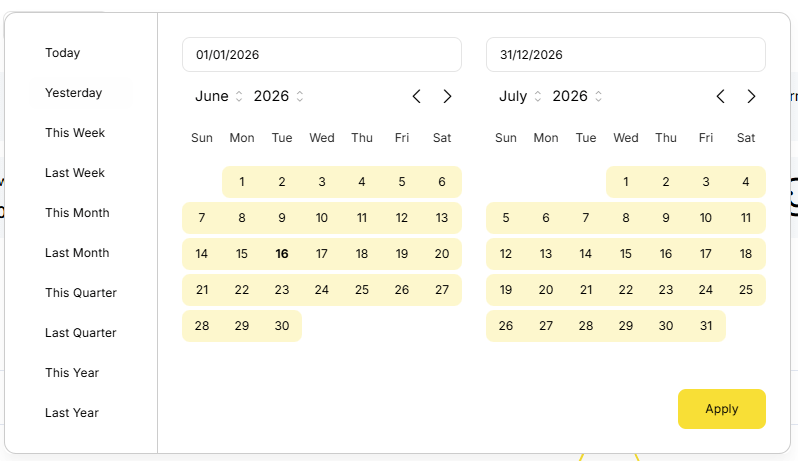
This is one of the simple filters and is used to define the period of your report, view, etc
- Today
- Yesterday
- This Week
- Last Week
- This month
- Last Month
- This Quarter
- Last Quarter
- This Year
- last Year
It is important to note that these definitions will change, according to what you have set as BUSINESS DAY START TIME and BUSINESS WEEK START DAY.

Filter by Transaction Data
Where you are dealing with a list of TRANSACTIONS, you will often see filters for :
- Store
- Search String
- Invoice Number
- Payment Date
- Closed Date
- Business Day
- Status
- Paid
- Refund
Filter by Void Data
Where you are dealing with a list of VIODED TRANSACTIONS, you will often see filters for :
- Store
- Search String
- Creation Date
- Void Date
- Void Reason
- Deduct
- With
- Without

Item List Filter
While you will usually be using a FILTER to remove results, this one also allows you to add something.
- Category
- Store
- Recipe
- Any
- With
- Without
- Item Type
- All
- Menu Item
- Retail Item
- Cost – toggle on to show
- costprice
- markup

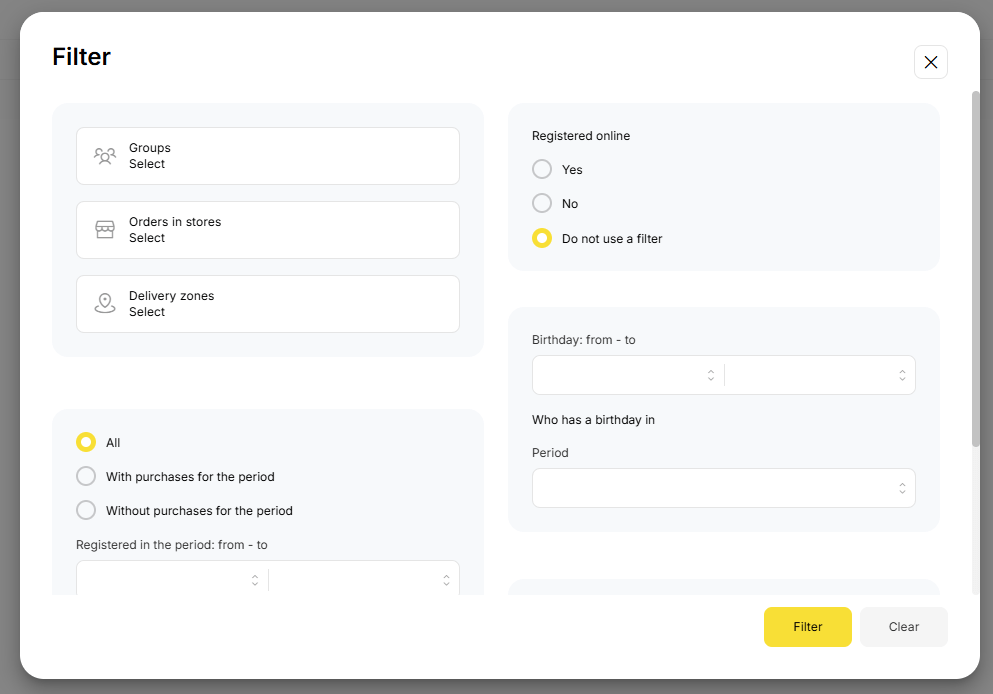
Customer List Filter
Basic Filter
- Customer group
- Search
Advanced Filter
- Group
- Orders in Store
- Delivery Zone
- Purchases or No Purchases in the Period
- Registration date range
- Total spend bracket
- Online registration or not
- Birthday range
- Birthday presets
- City
- Gender

Report Filters
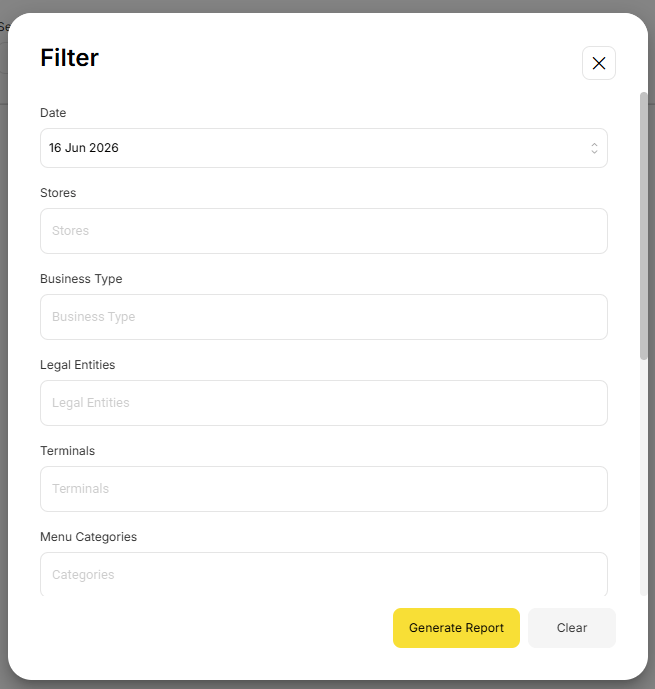
Pretty much any field in a report can be used to manipulate the data presented.
Some examples include :
- Date
- Stores
- Business Type
- Legal Entity
- Terminal name
- Category
- Common Modifier Group
- Menu / Retail Item
- Source Type
- Payment Method
- Tags
- Transfer
- From Location
- To location
- Employee
- Document Type
- Customer
- Customer Group
- Discount
- Reason
The list really is almost endless and will vary according to the data included in a report.
Data is Missing
This often happens because a FILTER has been set. Please remove / clear any filters.
Occasionally, a browser will cache a slow internet connection. Refresh or <F5> or using Dev Tools to disable caching will “fix”.
Very seldom one of the servers will have an issue.
Don’t panic. No data is lost.
As always, your YumaPOS Support Team are here to help.