
-
YumaPOS
-
- The YumaPOS Ecosystem
- Plan Where You Want to be in 6 and 12 Months from Now
- Create Your YumaPOS TENANT
- Create STORES in your YumaPOS TENANT
- Make Life Easy : Preset Some Basic Settings
- Which is best for You? Manual Entry or Data Import?
- Great Structure Makes Selling Easier
- Positive Planning Prevents Poor Performance
- POS and ORDER Fundamentals
- Getting to Know Your New BOM
- Cheap Internet Can Cost Businesses Time, Money and Productivity
- Security : Do you Really Want Your Staff Doing That?
- Stock Control: What It Is and How to Know If It’s Right for Your Business
- Scale Your Business : YumaPOS for Single to Franchise Growth
- A Quick Guide to Where ITEM Cost Comes From
- Know Your Customers, Earn Their Loyalty, Grow Your Sales
- Yumapos Price Lists, Holiday Promotions & Surcharging - Made Easy
- Glossary of Terms
- Show Remaining Articles (3) Collapse Articles
-
-
- Quickly List Transactions Created by Your STORES and APPs
- Easily See Transactions by Staff Member
- It is Simple to Track Sales by Terminal
- Processing Order Tracking: How to Minimise Operational Loss
- Voided Orders Explained: Why You Need to Catch Them
- Action Logs: Why they are Important to Your Business
-
-
- Articles coming soon
-
- Articles coming soon
-
- Articles coming soon
-
- Articles coming soon
-
- Articles coming soon
-
- Articles coming soon
-
- Articles coming soon
-
- Articles coming soon
-
- Articles coming soon
-
- Articles coming soon
-
- Articles coming soon
-
- Articles coming soon
-
- Articles coming soon
-
-
- Inventory Items & Menu Items: Can You Tell the Difference ?
- Your Easy Guide to Menu Item Basics
- How to View and Manage the Menu Items List
- Create and Manage Menu Categories Easily
- Understanding Item Modifiers for Accurate Production and Lower Costs
- Complete Guide to Managing Item Modifiers in Your Business
- Point of Sale Price Lists Made Easy : A Complete Guide
- Daily Menu Configuration and How to Use Them
- How to Use Stop Lists to Prevent Overselling
- Changing Default Language for Production
-
-
- Articles coming soon
-
- Articles coming soon
-
- Articles coming soon
-
- Articles coming soon
-
- Articles coming soon
-
- Articles coming soon
-
-
-
- Articles coming soon
-
- Articles coming soon
-
- Articles coming soon
-
-
-
- Articles coming soon
-
- Articles coming soon
-
- Articles coming soon
-
- Articles coming soon
-
- Articles coming soon
-
-
-
- Articles coming soon
-
- Articles coming soon
-
- Articles coming soon
-
- Articles coming soon
-
-
-
- Articles coming soon
-
- Articles coming soon
-
- Articles coming soon
-
- Articles coming soon
-
-
-
- Articles coming soon
-
- Articles coming soon
-
- Articles coming soon
-
- Articles coming soon
-
- Articles coming soon
-
- Articles coming soon
-
- Articles coming soon
-
- Articles coming soon
-
- Articles coming soon
-
- Articles coming soon
-
- Articles coming soon
-
-
-
- Articles coming soon
-
- Articles coming soon
-
- Articles coming soon
-
- Articles coming soon
-
- Articles coming soon
-
- Articles coming soon
-
- Articles coming soon
-
- Articles coming soon
-
- Articles coming soon
-
- Articles coming soon
-
- Articles coming soon
-
-
-
- Articles coming soon
-
- Articles coming soon
-
- Articles coming soon
-
- Articles coming soon
-
- Articles coming soon
-
- Articles coming soon
-
-
- Articles coming soon
-
- Articles coming soon
-
- Articles coming soon
-
- Articles coming soon
-
- Articles coming soon
-
- Articles coming soon
-
- Articles coming soon
-
-
- Articles coming soon
-
- Articles coming soon
-
- Articles coming soon
-
- Articles coming soon
-
- Articles coming soon
-
- Articles coming soon
-
- Articles coming soon
-
-
- Articles coming soon
-
-
-
YumaPAY
Definitions
Modifiers
Will “attach” themselves to a MENU ITEM and change the way that MENU ITEM is assembled, priced & costed.
In the YumaPOS ecosystem there are 2 types of MODIFIER :
Related Modifiers
Will have a 1:1 relationship with a MENU ITEM and are controlled by using “chains”.
Common Modifiers
May have a 1:many relationship with MENU ITEMS and are controlled by MODIFIER GROUPS.
Modifier Precedence
RELATED MODIFIERS GROUPS will always be presented first, i the order you have set while creating your “tree”.
COMMON MODIFIER GROUPS are then shown in the POSITION you dragged-n-dropped them into.
Similarly, the MODIFIERS inside those groups, will be presented in the order you have defined.
Which Works Best ?
Either method will allow you to set options such as :
- Price
- Minimum Quantity
- Maximum Quantity
- Free Quantity
- Image
- Tags
If a MODIFIER GROUP can be applied to multiple MENU ITEMS, it is easier to add a new MODIFIER or change the price, once. In this way, a single change is applied across all affected MENU ITEMS.
Whether you use none, one or both will really depend on “how” you sell your wares -especially if you intend to sell using a customer facing App.
Everybody knows pizza, so let’s do this by example.
Modifiers by Example
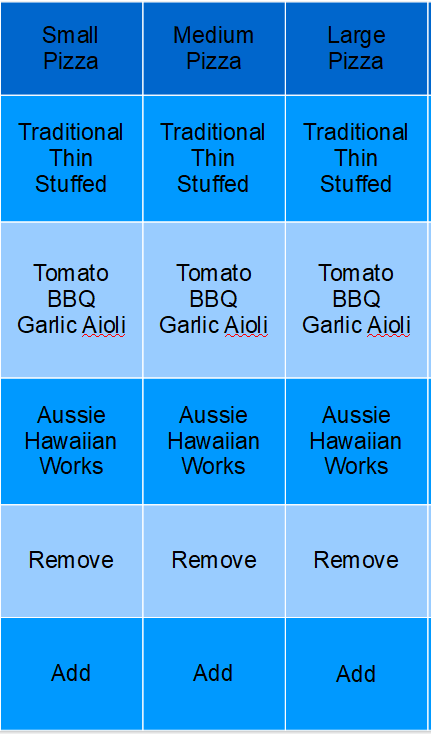
Our pizza shop sells 3 sizes of pizza, with the option of 3 bases, 3 base sauces and 3 flavours. We also allow customers to remove toppings and add extra ones.
The ordering flow looks something like this …
Non-Customer Facing Using Related Modifiers
Here is one way it could look like using only RELATED MODIFIERS…
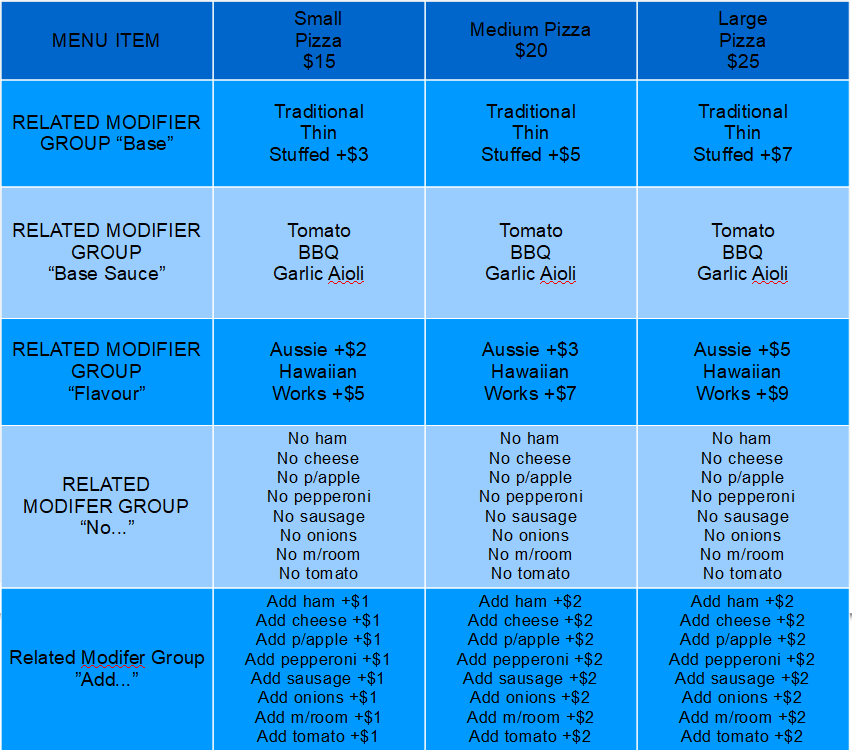
Can the CSR design the pizza the customer wants ? Yes.
Will the KITCHEN DOCKET print in a logical “build” order ? Yes
If the cost of “add pepperoni” went up 25%, could I update the selling price in the minimum of places ? No.
Would I use this example for a customer facing QR Order at Table, Web App, Uber, Mob App or Kiosk ? Definitely not.
Why not ?
It works !
What is the customer going to think about your business prowess when they order an Hawaiian Pizza ( ham, cheese and pineapple ), while you offer to remove sausage, onion and pepperoni ? Toppings that never existed on the pizza to begin with ?
Customer Facing Using Related Modifiers
With RELATED MODIFERS you can create IF-THEN “branches” in your “tree”.
Here is a modified version …
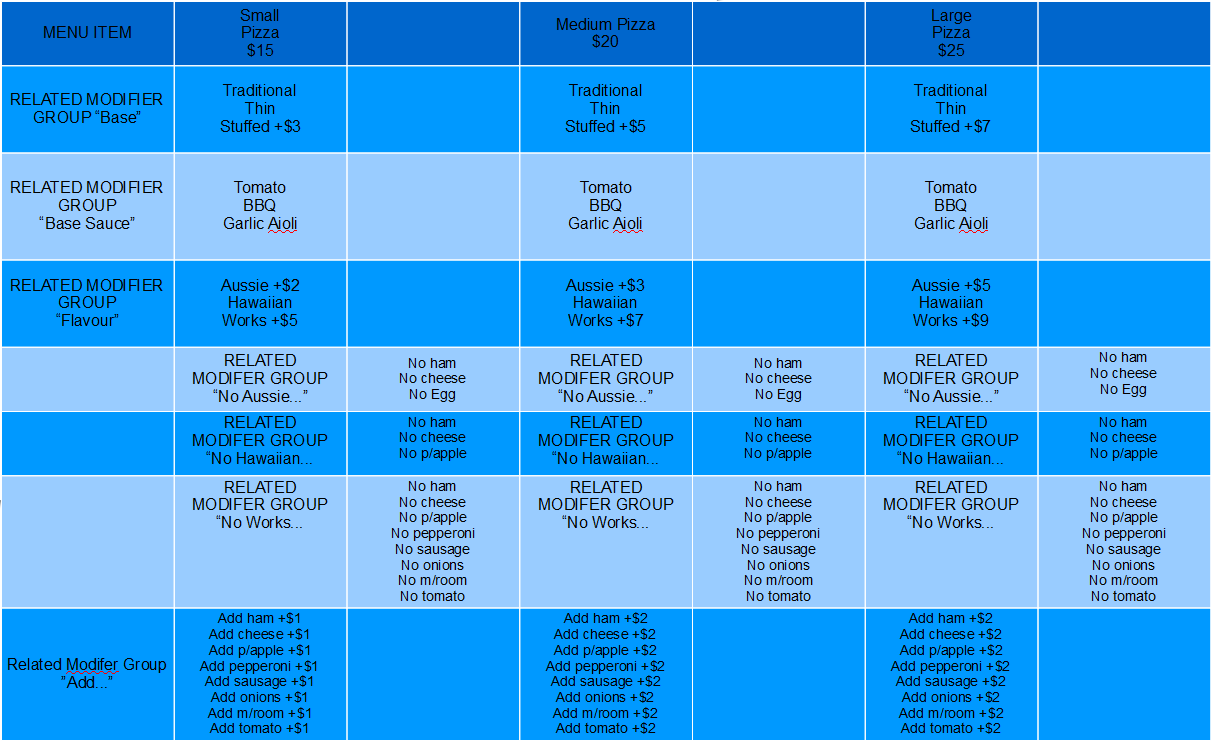
Before, we had 1 RELATED MODIFIER GROUP containing every possible “No”.
Now we have 3.
If “Aussie” is selected the next screen is still a list of “NO” toppings, but will only be for toppings that are actually on the chosen pizza.
Could I use this for a customer facing app ? Yes.
Would I use this for a customer facing app ? No.
My goal is to minimise the number of edits I need to make to change or add a MENU ITEM.
We are only looking at a 3 pizza shop … in the real world that number is a lot higher.
Can you imagine the complexity of the RELATED MODIFIER “tree” and “branches” ?
Introducing Common Modifiers
Our small shop has 3 flavours of pizza, it doesn’t matter what size is ordered, so why not put all the “No” into COMMON MODIFIER GROUPS based on flavour ?
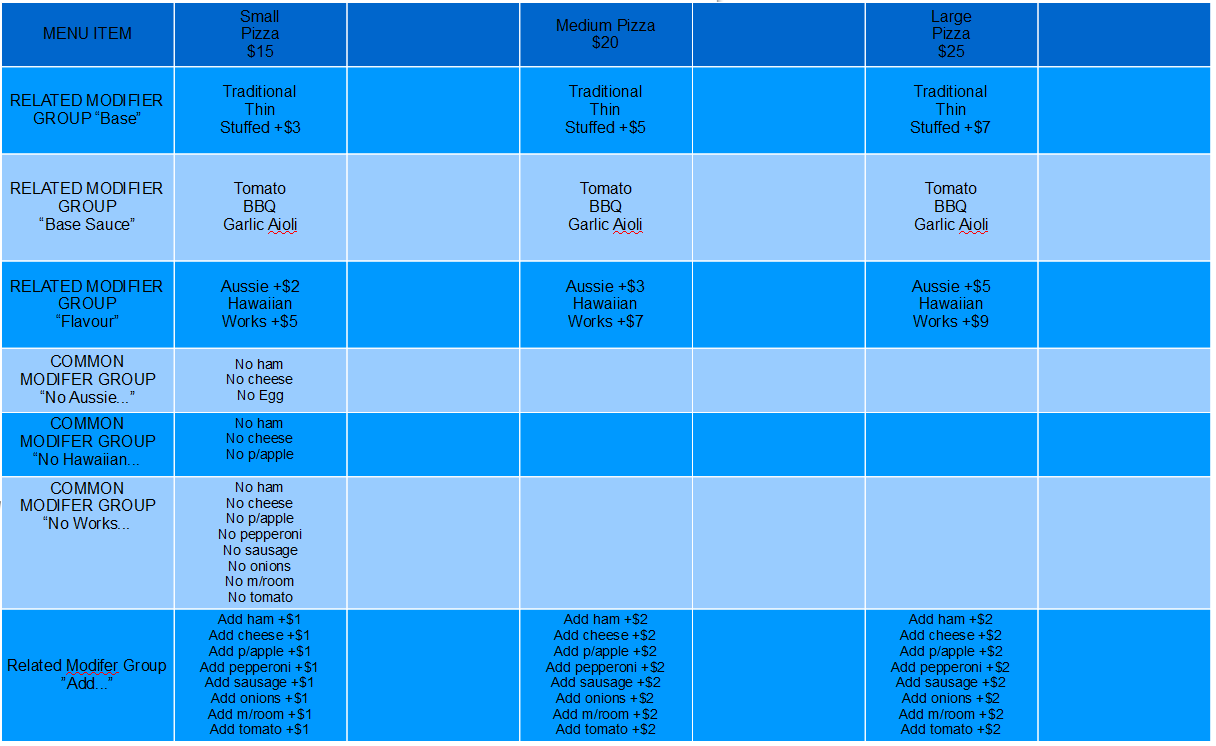
This is looking better.
I am not asking to remove toppings that are not on the pizza to begin with.
Having left the RELATED MODIFIER GROUPS for “Add …” leaves us with 2 issues.
- If the price goes up, we have to change that price many times in many places
- The “Add…” will appear in the wrong build order. It will appear BEFORE the “No …” due to precedence.
Get the Build Order Correct
I can use one COMMON MODIFER GROUP on all pizzas of the same size to add toppings.
Here is what it could look like …
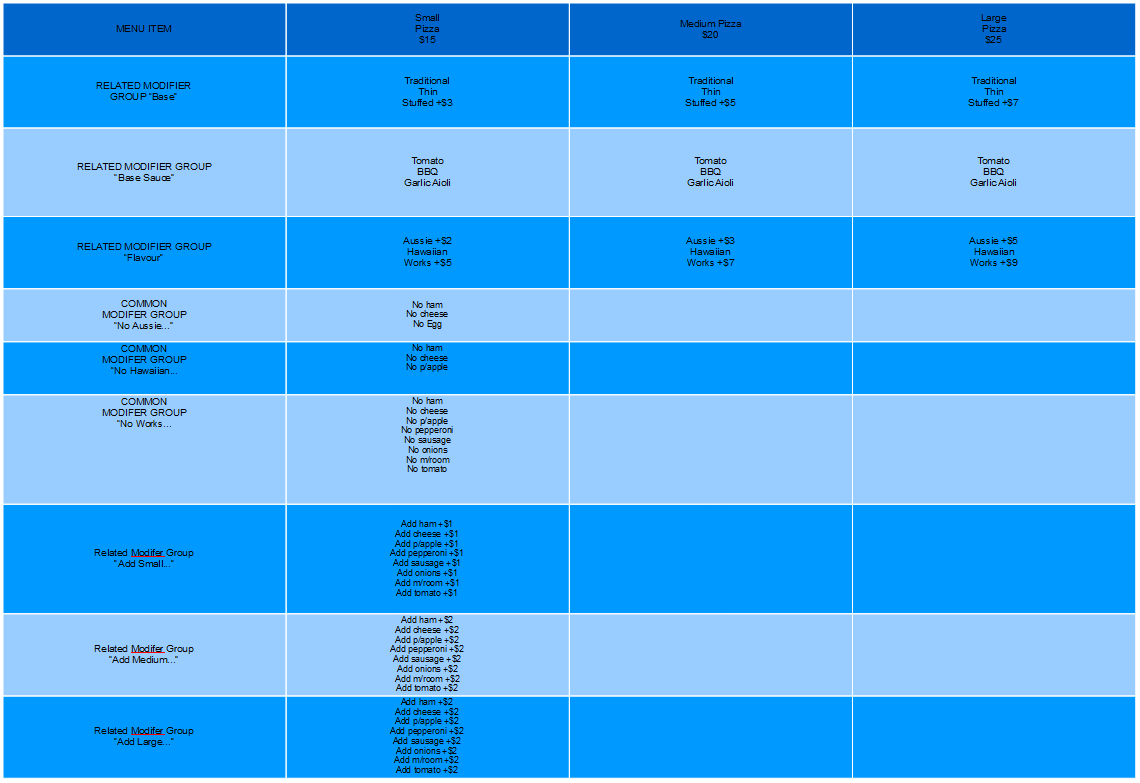
Can the CSR design the pizza the customer wants ? Yes.
Will the KITCHEN DOCKET print in a logical “build” order ? Yes
If the cost of “add pepperoni” went up 25%, could I update the selling price in the minimum of places ? Yes.
Would I use this example for a customer facing QR Order at Table, Web App, Uber, Mob App or Kiosk ? Yes.
Did you notice that the price to add extra toppings to a Large is the same as a Medium ? If I had done this as RELATED MODIFIERS, I would have to change each MENU ITEM in multiple places. With COMMON MODIFIERS it is very easy to change the price in the “Add Large …” group and have it applied to all large pizzas.
Put Compulsory Before Optional
Let’s add another complexity to taking an ORDER as fast as possible.
Consider the following :
- I like my coffee large, long & black. No sugar. No dash of cold. No fancy flavours.
- Others will have a small, half strength, skinny latte, with 1 sweetener , vanilla syrup and cold milk on the side.
Both ORDERS can be processed using MODIFIERS, but if you put the COMPULSORY MODIFERS first, you can skip over OPTIONAL MODIFIERS when ordering.
- <Large><Long Black><Done>
- <Small><Latte><Half Strength><Skinny><Sweetener><Vanilla><CMOS><DONE>
Yuppies !
Going back to our pizza example we can see that :
- Compulsory are size, crust & flavour.
- Optional are changing the base sauce, “No …” & “Add …” toppings.
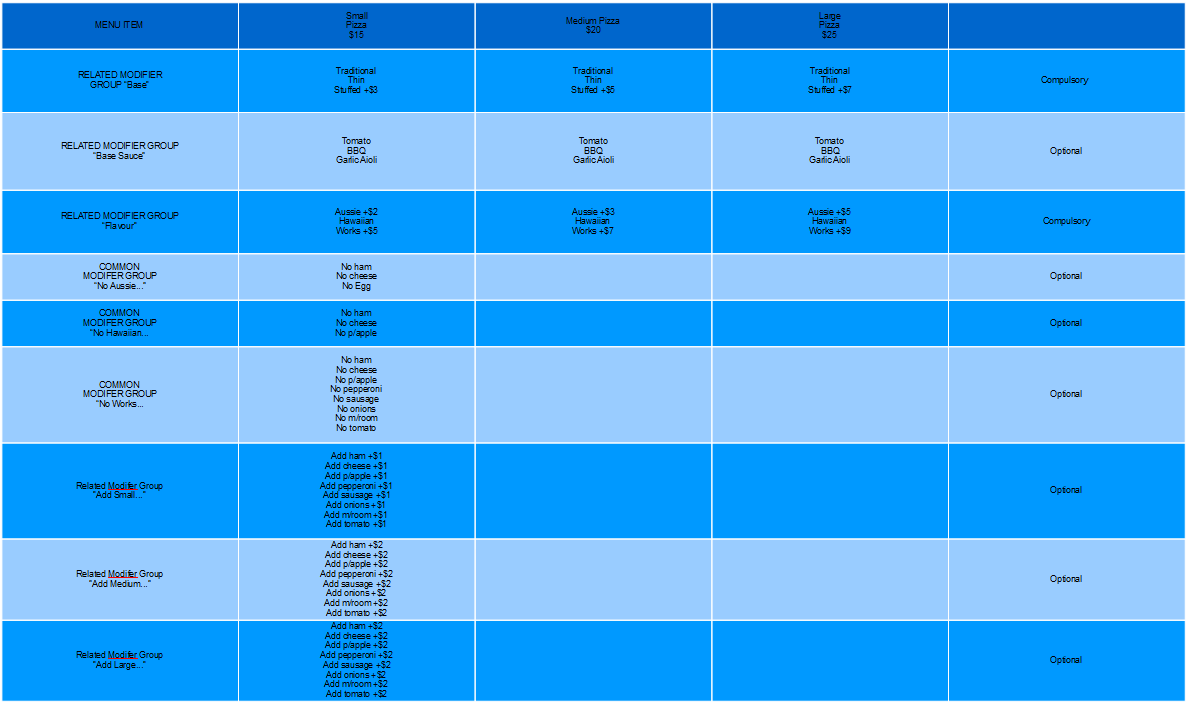
Once the cashier or customer has selected the COMPULSORY MODIFIERS, they may skip over the OPTIONAL MODIFIERS by selecting <DONE> or <Add to Cart>.


Getting this correct will lead to faster ordering and less production errors.