
-
YumaPOS
-
- The YumaPOS Ecosystem
- Plan Where You Want to be in 6 and 12 Months from Now
- Create Your YumaPOS TENANT
- Create STORES in your YumaPOS TENANT
- Make Life Easy : Preset Some Basic Settings
- Which is best for You? Manual Entry or Data Import?
- Great Structure Makes Selling Easier
- Positive Planning Prevents Poor Performance
- POS and ORDER Fundamentals
- Getting to Know Your New BOM
- Cheap Internet Can Cost Businesses Time, Money and Productivity
- Security : Do you Really Want Your Staff Doing That?
- Stock Control: What It Is and How to Know If It’s Right for Your Business
- Scale Your Business : YumaPOS for Single to Franchise Growth
- A Quick Guide to Where ITEM Cost Comes From
- Know Your Customers, Earn Their Loyalty, Grow Your Sales
- Yumapos Price Lists, Holiday Promotions & Surcharging - Made Easy
- Glossary of Terms
- Show Remaining Articles (3) Collapse Articles
-
-
- Quickly List Transactions Created by Your STORES and APPs
- Easily See Transactions by Staff Member
- It is Simple to Track Sales by Terminal
- Processing Order Tracking: How to Minimise Operational Loss
- Voided Orders Explained: Why You Need to Catch Them
- Action Logs: Why they are Important to Your Business
-
-
- Articles coming soon
-
- Articles coming soon
-
- Articles coming soon
-
- Articles coming soon
-
- Articles coming soon
-
- Articles coming soon
-
- Articles coming soon
-
- Articles coming soon
-
- Articles coming soon
-
- Articles coming soon
-
- Articles coming soon
-
- Articles coming soon
-
- Articles coming soon
-
-
- Inventory Items & Menu Items: Can You Tell the Difference ?
- Your Easy Guide to Menu Item Basics
- How to View and Manage the Menu Items List
- Create and Manage Menu Categories Easily
- Understanding Item Modifiers for Accurate Production and Lower Costs
- Complete Guide to Managing Item Modifiers in Your Business
- Point of Sale Price Lists Made Easy : A Complete Guide
- Daily Menu Configuration and How to Use Them
- How to Use Stop Lists to Prevent Overselling
- Changing Default Language for Production
-
-
- Articles coming soon
-
- Articles coming soon
-
- Articles coming soon
-
- Articles coming soon
-
- Articles coming soon
-
- Articles coming soon
-
-
-
- Articles coming soon
-
- Articles coming soon
-
- Articles coming soon
-
-
-
- Articles coming soon
-
- Articles coming soon
-
- Articles coming soon
-
- Articles coming soon
-
- Articles coming soon
-
-
-
- Articles coming soon
-
- Articles coming soon
-
- Articles coming soon
-
- Articles coming soon
-
-
-
- Articles coming soon
-
- Articles coming soon
-
- Articles coming soon
-
- Articles coming soon
-
-
-
- Articles coming soon
-
- Articles coming soon
-
- Articles coming soon
-
- Articles coming soon
-
- Articles coming soon
-
- Articles coming soon
-
- Articles coming soon
-
- Articles coming soon
-
- Articles coming soon
-
- Articles coming soon
-
- Articles coming soon
-
-
-
- Articles coming soon
-
- Articles coming soon
-
- Articles coming soon
-
- Articles coming soon
-
- Articles coming soon
-
- Articles coming soon
-
- Articles coming soon
-
- Articles coming soon
-
- Articles coming soon
-
- Articles coming soon
-
- Articles coming soon
-
-
-
- Articles coming soon
-
- Articles coming soon
-
- Articles coming soon
-
- Articles coming soon
-
- Articles coming soon
-
- Articles coming soon
-
-
- Articles coming soon
-
- Articles coming soon
-
- Articles coming soon
-
- Articles coming soon
-
- Articles coming soon
-
- Articles coming soon
-
- Articles coming soon
-
-
- Articles coming soon
-
- Articles coming soon
-
- Articles coming soon
-
- Articles coming soon
-
- Articles coming soon
-
- Articles coming soon
-
- Articles coming soon
-
-
- Articles coming soon
-
-
-
YumaPAY
Overview of Customer Segmentation
It is great that you have all of these Customers. Pages and Pages of them. By grouping customers based on shared characteristics, behaviours or needs, companies can improve customer satisfaction, increase sales and ultimately enhance profitability.
Customer groups allow businesses to :
- Tailor marketing strategies through Promotions
- Enhance customer engagement and feedback
- Identify high value segments to help allocate scarce resources
- Prioritise and personalise engagement
- Build buyer personas to help drive business results
Don’t just think of Customer Groups as a way to make it easier for you to find them. Make them a strategic move to increase sales.
After all, isn’t it easier to retain a Customer than attract a new one ?
Understanding the Common Groups
Every single Customer will be a part of the Common Group.
It doesn’t matter how they became a Customer, YumaPOS will assign them to the Common group.
How to View Customer Groups in the BOM
Using your BOM, navigate to Customers / Groups.
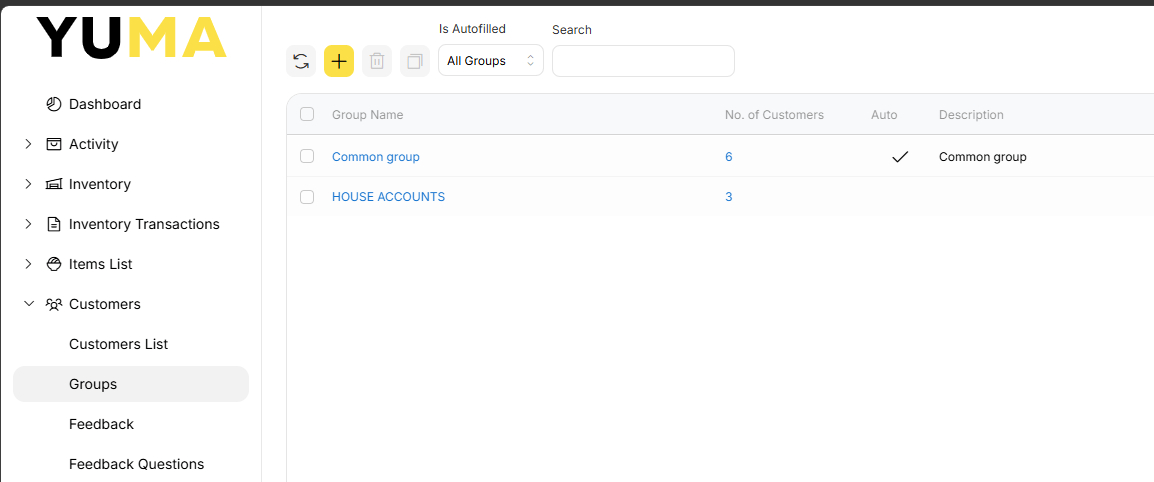
In this view we can see the Menu Bar that is relevant to Customer Groups.
- Refresh the view
- <+> a new Customer Group
- Delete the selected Customer Group
- Copy the selected Customer Group
- Filter by Group Type
- All Groups
- Auto-Filled Groups
- Manual groups
- Search by a partial match
Followed by a list of all Customer Groups that match any Filter you have set in the Menu Bar.
Adding a New Customer Group
Select the <+> icon in the Menu Bar to create a new Customer Group.
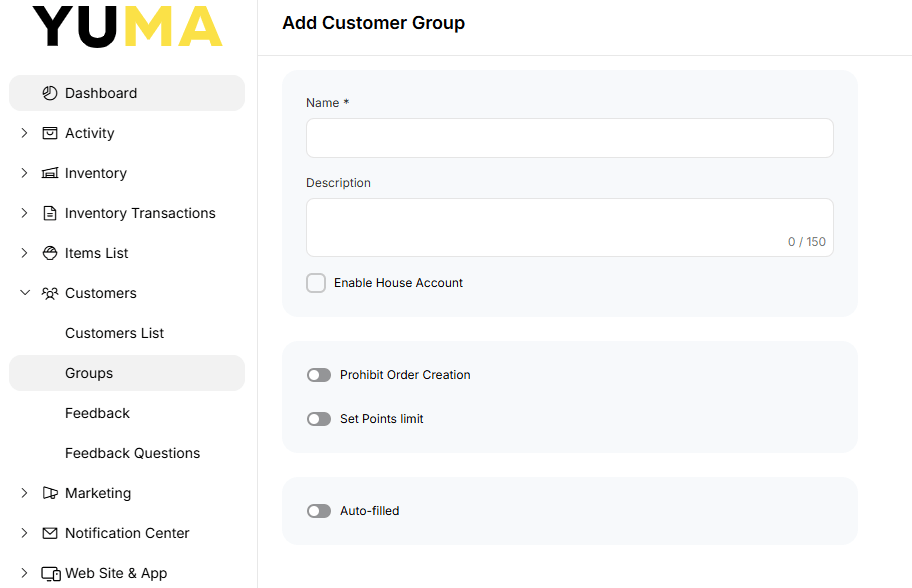
Configuring POS Customer Settings & House Credit
- Name : Compulsory. Use something that uniquely identifies what type of Customers are in this Group. eg Financial Members.
- Description : Used to help the logged in BOM User understand the meaning / reason for this Customer Group.
- Enable House Account : When toggled to ON, any Customer in this Group may have an active Credit Balance. Eg. You may decide to let Customers in this Group purchase from you on credit. Refer to the seperate Article for other uses / examples.
- Prohibit Order Creation : Allows you to prevent any Customer in this Group from placing Orders via any of your channels.
- When enabled, you will be able to craft a message to be shown.
Setting Loyalty Points Limits & Auto-Filled Criteria
- Set Points Limit : Customers in this Group will have the value of Loyalty Points spent / earnt capped to the given amount for the period specified
- Per Day
- Per Week
- Per Month
- Per 3 months
- Auto-Filled : This is a fantastic way to handle large Customer databases. In brief, when a given set of criteria are met, a Customer is automatically added to this Group. See separate Article for an in depth discussion.
Deleting a Customer Group
Put a tick in the box, select <Delete> and confirm you want to delete the selected Group/Groups.
Please note that this will only delete the Customer Group, not the Customer.

Copying a Customer Group
Put a tick in the box & select <Copy>.
Adjust Group Name etc to suit.